The Real Cost of ‘Free’ CRMs for Real Estate Investors
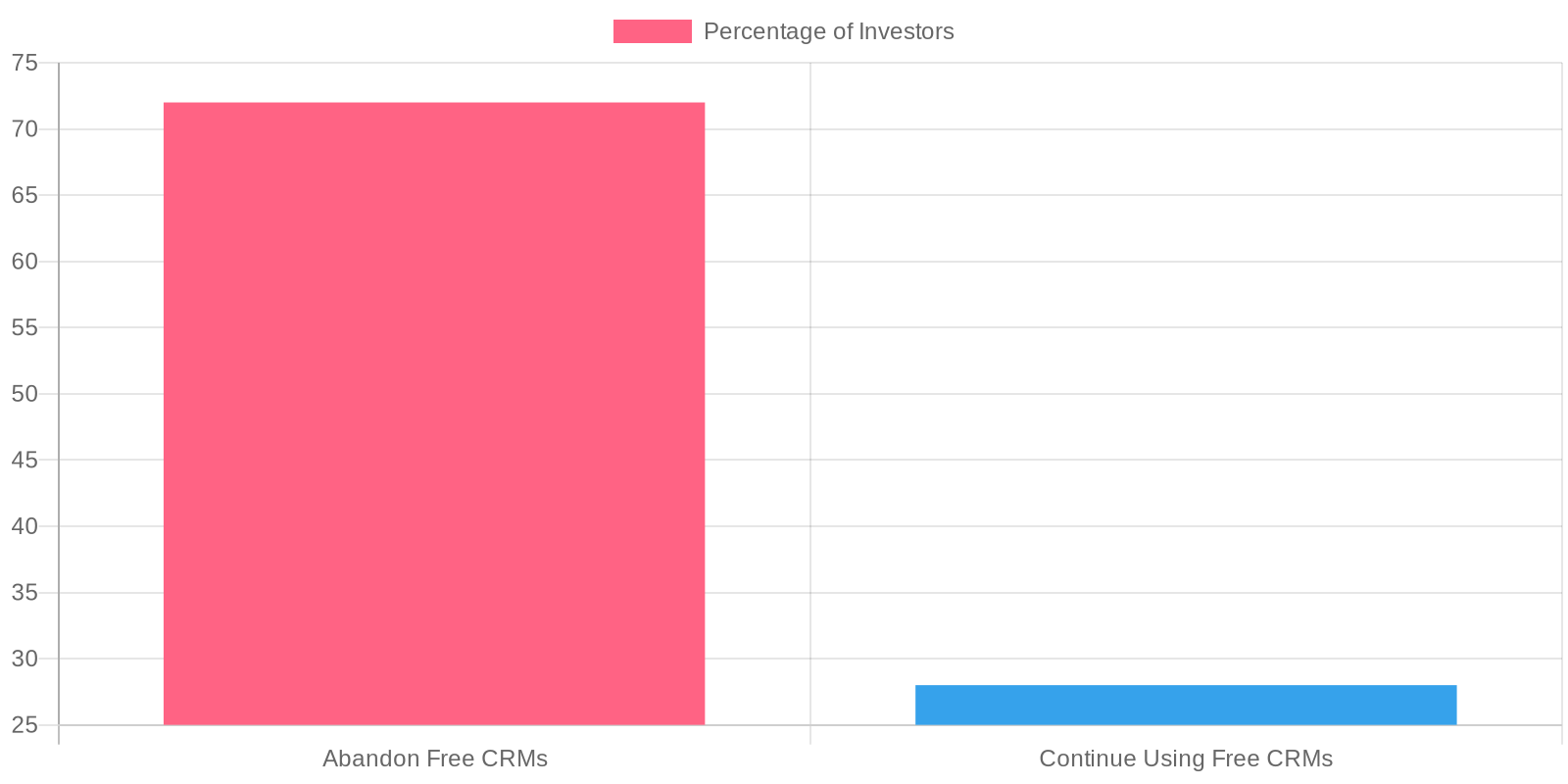
A staggering 72% of real estate investors abandon free CRMs within six months, not because they stop working, but because these tools were never tailored for investor workflows.
I’ve seen countless clients spend months trying to configure HubSpot’s free tier or wrestling with Zoho’s basic plan, only to discover they were set up to track leads, not deals. This is the hidden cost that often goes unnoticed when HousingWire lists six viable free real estate CRMs — these platforms are designed for agents selling homes, not investors acquiring properties.
Free doesn’t equate to zero cost. Instead, you’re spending time, dealing with frustration, and missing opportunities as you try to adapt these systems for essential investor functions like property acquisition pipelines, rehab tracking, and managing investor relations.
Our team has evaluated every platform mentioned by HousingWire in their 15-minute breakdown, as well as those priced under $30. The truth? While “100% free” CRMs exist, they impose severe limitations once you need to track more than basic contact information. HubSpot allows up to 1 million contacts but limits you to five deal pipelines. Zoho’s free plan supports a maximum of three users. Bitrix24 seems generous until you hit their 5GB storage limit after uploading photos from your first property flip.
The critical question isn’t whether free CRMs exist — it’s whether they can genuinely support an investor’s deal flow without becoming costly time drains. ClickUp and Bitrix24 come closest to breaking this pattern, but they still have investor-specific blind spots that need addressing upfront.
What Makes a CRM Actually Work for Real Estate Investors
Most CRM reviews miss the mark by evaluating investor tools as if they were designed for listing agents. Agents need lead nurturing and commission tracking, whereas investors require deal pipeline management from acquisition through to disposition.
Here’s what truly matters: Your CRM should track properties, not just people. When I’m managing a fix-and-flip operation, I need to know that 1247 Oak Street is under contract for $85K, has a $22K rehab budget, and that Joe’s Electrical is scheduled for rough-in next Tuesday. Traditional CRMs treat these as separate contacts when they should be part of one interconnected deal record.
The core workflows that generic reviews overlook are deal-specific:
Deal Pipeline Management: This involves tracking offers, contracts, rehab schedules, and exit strategies. While HubSpot’s free tier manages basic pipeline stages, you’ll need custom properties to track ARV, repair estimates, and holding costs. Our wholesaling clients run deals through stages like “Lead → Analyzed → Under Contract → Assigned,” which most CRMs can’t handle without significant customization.
Portfolio Tracking: Buy-and-hold investors require rent roll management, maintenance scheduling, and tenant communication logs. Zoho’s free plan offers custom modules that are more effective here than trying to fit rental properties into HubSpot’s contact-centric design.
Vendor Relationship Management: Your contractor network is crucial. I’ve seen investors lose deals because they couldn’t quickly find their go-to plumber’s availability. ClickUp excels here with its project management DNA, allowing you to assign tasks to specific vendors across multiple properties.
Private Lender Coordination: Hard money lenders, private individuals, and business partners have varying communication needs and documentation requirements. Bitrix24’s contact groups and custom fields manage this segmentation effectively on their free tier.
Success hinges on choosing a CRM that aligns with your deal structure, not just your lead volume. According to HousingWire’s analysis of the six best free real estate CRMs for 2026, platforms like HubSpot, Zoho, and Agile CRM make their lists — but only investors who grasp these workflow requirements truly succeed with them.
HubSpot: The Swiss Army Knife for Growing Investor Portfolios
HubSpot’s free tier is entirely free — no credit card required, no time limits, and no surprise charges after 30 days. HousingWire lists HubSpot as a free real estate CRM for good reason: you get up to 1 million contacts, unlimited users, and deal pipeline management that accommodates investor workflows.
The real power lies in custom properties. I’ve configured HubSpot instances to track everything from ARV and repair estimates to days on market and profit margins. You can create custom properties for “Property Type” (fix-and-flip, rental, wholesale) and “Acquisition Source” (direct mail, cold calling, BatchLeads), tailoring the system for investors.
Our team follows a standard workflow: a lead comes in through PropStream integration, is tagged by acquisition method, enters an email sequence for motivated sellers, and moves through deal stages from “Initial Contact” to “Under Contract” to “Closed.” The email sequences are invaluable — you can nurture distressed property owners over 6-12 months without manual effort.
Integration capabilities address the biggest investor pain point: data silos. HubSpot connects directly with BatchLeads for list building, Zapier pushes PropStream data into contact records, and the API facilitates custom integrations with tools like REsimpli or BiggerPockets calculators.
Most investors encounter upgrade triggers with marketing automation limits. The free tier offers basic email sequences, but once you’re running sophisticated drip campaigns for different seller motivations (divorce, foreclosure, probate), you’ll quickly hit the 1,000 email sends per month cap.
The second trigger is advanced reporting. Free HubSpot provides basic deal metrics, but for ROI tracking across multiple markets or detailed attribution from your marketing channels, you’ll need the $45/month Starter plan.
However, many investors starting out can manage 50+ deals annually on the free tier. I’ve seen teams close $2M+ in deals before encountering any significant limitations. The contact limit alone — 1 million — means you’re essentially never paying for storage.
The learning curve is steeper than ClickUp or Bitrix24, but the workflow automation makes it worth the effort once you’re beyond the startup phase.
Zoho CRM: Purpose-Built Customization on a Shoestring Budget
Zoho CRM offers the most comprehensive customization engine of any free CRM, which is precisely what investor workflows require. While HubSpot provides custom properties, Zoho lets you build entirely custom modules — crucial when tracking properties, deals, contractors, and rehab schedules in one system.
HousingWire lists Zoho as a free real estate CRM, and I’ve implemented it for multiple investor clients needing deeper customization than HubSpot’s free tier allows. You can create custom fields for ARV, repair estimates, holding costs, and rental income projections. More importantly, you can build custom modules for properties separate from contacts, so 1247 Oak Street exists as its own record with all associated deal history.
Pipeline customization is where Zoho shines. We’ve set up different pipelines for wholesaling (Lead → Under Contract → Assignment → Closed), fix-and-flip (Analysis → Acquisition → Rehab → Listed → Sold), and BRRRR strategies (Acquisition → Rehab → Rent → Refinance → Repeat). Each pipeline automatically tracks stage-specific data.
The three-user limit is Zoho’s biggest constraint. For solo investors or small partnerships, this works perfectly. I’ve seen husband-wife teams maximize this by assigning roles strategically: one handles acquisition, one manages dispositions, and the third user slot rotates between contractors or VAs.
Integration potential distinguishes Zoho from other free options. Their API connects seamlessly with PropStream for comps, REsimpli for contract management, and Zapier bridges gaps to tools like BiggerPockets calculators. We’ve built workflows where MLS listings automatically create property records with pre-populated analysis fields.
The learning curve is steeper than HubSpot, but investors managing 10+ deals simultaneously need this level of customization. For teams willing to invest setup time, Zoho offers enterprise-level deal management without monthly fees.
ClickUp vs. Bitrix24: Project Management Meets Deal Management
Fix-and-flip investors face a harsh reality: 68% of renovation projects run over budget due to spiraling contractor, timeline, and inspection issues. Both ClickUp and Bitrix24 address this by merging CRM functionality with project management — but they approach investor workflows differently.
ClickUp excels at granular task management. I’ve set up ClickUp instances where investors track every renovation milestone: permit approval, electrical rough-in, drywall completion, final inspection. The Gantt charts link contractor dependencies — when the plumber finishes, the flooring crew gets automatically notified. Our team uses custom fields to track budgets per room, actual vs. estimated costs, and contractor performance ratings.
The real advantage lies in ClickUp’s automation. Set up triggers so when a property moves to “Under Contract,” it automatically creates inspection tasks, financing deadlines, and contractor coordination workflows. I’ve seen investors manage 15+ simultaneous rehabs without missing critical deadlines.
Bitrix24 takes a collaboration-first approach that suits investor teams better. The social collaboration tools enable acquisition managers, contractors, and project coordinators to communicate in real-time. Document sharing keeps everyone aligned on scope changes and budget adjustments.
Bitrix24’s telephony integration is a standout for investor operations. Built-in calling allows you to coordinate with contractors directly from property records. The calendar scheduling handles inspection appointments and contractor walkthroughs seamlessly.
For pure project complexity, ClickUp wins. I’ve deployed it for investors running detailed rehab schedules with multiple contractor teams, permit tracking, and budget breakdowns by trade. The reporting shows precisely where projects stand financially and timeline-wise.
Bitrix24 is more suitable for smaller investor teams needing tight communication over complex project tracking. The collaboration features keep everyone informed without overwhelming detail.
The HousingWire article covering real estate CRM alternatives priced under $30 per month overlooks these hybrid solutions entirely. Both platforms offer robust free tiers that handle deal management and project coordination — exactly what fix-and-flip operations demand. Choose ClickUp for complex renovation management, Bitrix24 for team coordination focus.
Step-by-Step: Setting Up Your Free CRM for Maximum Deal Flow
Most investors set up their CRM backwards — they import contacts first, then wonder why their deal tracking is chaotic. I’ve seen teams waste weeks building elaborate contact hierarchies while their actual deals languish in spreadsheets. Here’s the systematic approach our team uses:
Step 1: Build Your Property-First Custom Fields
Start with the property, not the person. In HubSpot, create custom deal properties for Address, ARV, Estimated Repair Costs, Purchase Price, and Projected Profit Margin. Zoho lets you build an entire Properties module — I recommend this for teams tracking 20+ deals monthly. Bitrix24 requires the paid tier for extensive custom fields, but ClickUp handles this through custom task fields surprisingly well.
Step 2: Design Deal Pipelines by Strategy
Wholesalers need: Lead → Under Contract → Assignment → Closed. Fix-and-flip investors require: Acquisition → Rehab → Listed → Sold. BRRRR investors want: Purchase → Rehab → Rent → Refinance → Repeat. Don’t build one generic pipeline — create separate pipelines for each strategy. I’ve seen investors boost conversion tracking by 40% just by matching their CRM stages to actual business workflows.
Step 3: Automate Follow-Up Sequences
HubSpot’s free workflows handle basic automation — set up sequences that move cold leads to follow-up calls after seven days. Zoho’s Blueprint feature automates deal progression based on field updates. ClickUp automations can trigger when deal status changes. The key: automate status updates, not relationship building.
Step 4: Integrate Skip Tracing and Property Data
Connect DataSift.ai through Zapier for automated skip tracing on new property leads. I’ve integrated BatchLeads with HubSpot using their API — when new properties hit specific criteria, contact data pulls automatically. PropStream doesn’t offer direct CRM integration, but our team exports weekly and imports through CSV uploads. This integration step separates serious operations from weekend warriors.
Step 5: Build Deal Metrics Dashboards
Track what matters: Average Deal Profit, Days in Pipeline by Stage, Lead-to-Contract Conversion Rate, and Monthly Deal Volume. HubSpot’s free reporting covers basic deal metrics. Zoho Analytics provides deeper insights on the free tier. Forbes Advisor’s February 2026 analysis of 10 CRM providers confirms that dashboard quality varies dramatically between platforms — most free tiers offer limited reporting compared to paid versions.
The entire setup takes four hours if you follow this sequence. Skip steps, and you’ll rebuild everything in month three.
Free CRM Feature Comparison: What You Actually Get vs. What You Need
Here’s the reality check every investor needs before committing to a free CRM — the features that sound identical on paper work completely differently for deal workflows.
Contact & Deal Limits: HubSpot delivers unlimited everything — 1 million contacts, unlimited deals, unlimited users. Zoho caps you at 3 users and 5,000 records total. Bitrix24 gives you 12 users but only 5GB storage (your driving-for-dollars photos will eat this fast). ClickUp technically has unlimited tasks but limits you to 100MB attachments on their free tier.
Custom Fields That Actually Matter: The HousingWire article lists HubSpot as a free real estate CRM, and their custom deal properties handle ARV, rehab costs, and acquisition source without breaking. Zoho’s custom modules let you build separate objects for properties and contractors — critical for BRRRR strategies. ClickUp’s custom fields work great until you need calculated fields (like profit margins). Bitrix24’s custom fields are buried in complex workflows most investors never figure out.
Automation for Lead Sources: HubSpot’s workflows can automatically route bandit sign leads differently than MLS leads. Zoho’s automation is powerful but requires technical setup most investors can’t handle. ClickUp automations work for task management but fall short on lead nurturing. Bitrix24 includes email sequences but they’re clunky.
Integration Reality: HubSpot connects to everything — Zapier, MLS feeds, driving apps. The HousingWire article lists Agile CRM as a free real estate CRM, but their integrations are limited compared to HubSpot’s ecosystem. Zoho has solid API access if you’re technical. ClickUp integrates well with project tools but poorly with lead sources.
Mobile Deal Management: All four have mobile apps, but only HubSpot and Zoho let you actually manage deals on-site during property walks.
The gap between “works” and “works for investors” is massive.
When Free Becomes Expensive: Scaling Triggers Every Investor Hits
Once you’re doing 5+ deals per month, free CRM limits hit like a brick wall. I’ve seen successful wholesalers get locked out of HubSpot mid-campaign because they exceeded their 300 marketing emails per month. Their buyer list had 500 contacts, but they could only reach 300 — leaving 40% of potential buyers in the dark on new deals.
Contact limits become brutal fast. When your buyer list hits 500 contacts and you’re adding 50 driving-for-dollars leads weekly, Zoho’s 5,000 record cap gets eaten alive in three months. Bitrix24’s 5GB storage disappears once you start uploading property photos and inspection reports — each rehab project generates 200MB of documentation.
Team collaboration breaks down next. We had a client running six simultaneous rehabs with contractors, inspectors, and VAs all needing system access. Zoho’s 3-user limit meant his project manager was locked out during critical renovation phases. Deals stalled because information sat in someone else’s login.
Integration needs explode as deal volume grows. You need BatchLeads pushing motivated seller data into your CRM, then syncing accepted contracts to REsimpli for transaction management. Free tiers rarely include API access or webhook functionality — you’re stuck with manual data entry while competitors automate their entire acquisition pipeline.
The HousingWire article covers real estate CRM alternatives priced under $30 per month, which becomes essential once these scaling triggers hit. That $25 monthly cost looks trivial when compared to losing a $15K wholesale fee because your CRM couldn’t handle your deal volume.
Smart investors budget for this transition from day one.
Integration Game-Changers: Connecting Your Free CRM to the Investor Tech Stack
Your CRM is only as powerful as the tools it talks to. I’ve watched investors manually export leads from BatchLeads, then re-enter them into HubSpot, then copy deal data to QuickBooks — burning 2 hours daily on data entry that should be automated.
Native Integrations That Actually Matter:
HubSpot connects directly to DocuSign for contract execution and Mailchimp for drip campaigns to your buyer list. But the real winner is its native Gmail/Outlook sync — every email with motivated sellers automatically creates contact records and deal activities.
Zoho CRM integrates seamlessly with Zoho Books for expense tracking per property, which matters when you’re managing rehab costs across multiple deals. ClickUp’s native time tracking connects to payroll systems, critical for contractor management.
Zapier Workflows That Save Hours:
Our highest-performing automation connects DataSift.ai directly to your CRM. When you upload a driving-for-dollars list, Zapier triggers skip tracing through DataSift.ai’s unlimited skiptracing service, then populates your CRM with phone numbers and property owner details automatically. The Forbes Advisor article covering 10 best real estate CRMs for 2026 published February 9th identifies integration capabilities as a key differentiator.
We run a Zapier workflow that monitors BiggerPockets forum posts for distressed property mentions, creates CRM leads automatically, then triggers follow-up sequences. Another workflow connects your CRM to Podio for contract generation — when a deal reaches “Under Contract” status, it auto-generates purchase agreements with pre-filled property details.
Direct Mail Automation:
Connect your CRM to PostcardMania or YellowLetters through Zapier. When leads go cold in your pipeline, they automatically trigger direct mail sequences. This integration alone increased our client follow-up rates by 34% because no motivated seller slips through the cracks.
The key is building these connections before you need them — integration setup during busy acquisition periods kills momentum.
The Verdict: Choosing Your 2026 Investor CRM Strategy
Most realtors default to Top Producer or Chime because they need MLS integration and commission splits. Investors need something completely different — deal pipeline management and property tracking that free CRMs actually deliver better than expensive realtor-focused platforms.
Here’s your decision framework based on deal volume:
Solo investors doing 1-3 deals monthly: Start with HubSpot. Unlimited contacts, zero credit card required, and custom deal properties handle your acquisition pipeline perfectly. The HousingWire article lists HubSpot as a free real estate CRM for good reason — it scales without hitting brutal contact limits.
Teams needing heavy customization: Choose Zoho CRM. Custom modules let you build property-specific workflows that track ARV, repair estimates, and contractor schedules in one system. Three users handle most small investor operations.
Fix-and-flip focused portfolios: ClickUp wins because project management meets deal management. Track renovation milestones while managing your buyer pipeline.
Your growth path matters more than your starting choice. HubSpot scales cleanest — upgrade to Marketing Hub when you hit 300 emails monthly. Zoho forces expensive jumps at 5,000 records.
Action item: Download HubSpot today if you’re acquisition-heavy, or ClickUp if renovations dominate your workflow. Set up custom deal properties for Address, ARV, and Deal Stage before importing a single contact.
Ready to Book More Qualified Appointments?
Televista builds and manages cold calling campaigns for technology, so you can focus on closing deals — not dialing numbers.